See Beyond Tech

  • Subscribe to our RSS feed.
  • Twitter
  • StumbleUpon
  • Reddit
  • Facebook
  • Digg

Sunday, 19 October 2008

Vista/XP Tip: iRotate a free utility to rotate your computer display

Posted on 18:09 by Unknown

image If you have a monitor that that can rotate, then you'll also need your computer to rotate the video output so that you can use different ratios with your monitor. But the problem is that if you don't have the right video drivers, you wont be presented with an option to rotate your screen. Plus, even Vista doesn't have the native capability to rotate the screen unless you install 3rd  party drivers. And for me installing drivers is always a hassle, so I'm glad I stumbled across this little utility that can help you rotate your screen.

It's called iRotate and its a no-nonsense little utility that works on almost all Windows Operating systems out there and allows you to rotate your video output from your graphics cards without a hitch. It utilizes the inbuilt functionality of your card and all you need to do is download it and install it. Plus, its completely free, so there's no reason why you shouldn't use it if you have a monitor that can rotate.

Rotating your monitor can have many benefits. For example, you can read a page with less scrolling. You can scale PDF/HTML ebooks (if you don't have any then you can learn more on how to get e-books of your favourite authors and stories in this post.) much more easily and read it in a paper-like portrait format.

As for why even Vista doesn't have the ability to natively rotate your display is beyond my comprehension. Even OS X tiger had that feature. I wonder why they didn't copy it... because I only stumbled on this tool after a lot of searching. Hopefully it'll be easier for you since you know what to do now.

Read More
Posted in downloads, free, Windows | No comments

The Outlook .Pst File – what is it and how to find it

Posted on 14:49 by Unknown

Everything was going just fine, until one fine day during one of the scheduled defragmentations of my wonderful Windows XP hard drive, I actually paid some attention to what Disk Defragmenter was saying. And it said that it could defragment everything, except 1 file… and guess what that file was? The Outlook.pst file.

image

Now, for those of you who do not know what this file is, it’s pretty much a file that stores all the e-mails, attachments, contacts (even recently used contacts) and calendar information that Outlook has. Why would Outlook store everything in 1 big file? Probably to make it easier to back-up. But what happens when that file gets so big, it becomes unruly? You need to hunt it down and get rid of it.

Here’s the low down on how to find this beast of a file. First, you’ll have to show hidden files and folders (Open My Documents or any other Explorer Window > Tools > Folder Options > View Tab > Show hidden files and folders > OK) and then navigate to “C:\Documents and Settings\Rishi\Local Settings\Application Data\Microsoft\Outlook”.

The coolest way (and the easiest way) to do this is to copy the address above (only copy the stuff between the double quotes) and then press Windows Key + R key and paste the string in. Then change YourUserName to your username and press enter.

image

Viola. You should see a window like the one below, where the Outlook.pst file will be waiting for you.

image

Now, in my case, I decided to delete the Outlook.pst file, because all my e-mail is still safe and secure on Gmail’s/Hotmail’s web servers. And because of that I don’t really need the extra copies of all attachments ever emailed to me residing in my hard drive taking up some valuable space. However, in your case it might be different. You might have downloaded all the e-mail from your webmail server to your computer. You might also be storing all your contacts on your hard drive. So in that case, the best thing to do is merely back-up the file once in a while and not worry about it.

After I deleted the file however, Outlook 2003 asked me if I wanted to create a new one. So I did, and now I can start all over again, and hopefully this time it won’t clog up so much.

image

Read More
Posted in Outlook, tip, Windows | No comments

Thursday, 16 October 2008

Full-screen distraction free writing environments for Windows and Linux

Posted on 21:31 by Unknown

I love the idea of WriteRoom for the Mac, but it's a Mac only application. If you're on Windows or on Linux you'll probably have to use these free alternatives (the non-free alternative being “buy a Mac”). All of them perform the same tasks and have similar interfaces.

Unlike WriteRoom, however, these applications do not have a scrollbar for spell check. They're all black windows with green text and that's pretty much it. Of course, you can change the colour of the background and the text

JDarkroom for Windows and Linux

A simple full-screen text editor

image

You can download it here.

Darkroom for Windows

From the website:

Dark Room is a full screen, distraction free, writing environment. Unlike standard word processors that focus on features, Dark Room is just about you and your text.

Basically, Dark Room is a clone of the original WriteRoom that is an OS X (tiger) exclusive application. It is a child of necessity, as there were no viable alternatives in Windows to produce the same behaviour. Sure, you can kind of emulate the behaviour by jumping through a bunch of hoops in Word/Writer, but it isn’t the same. Also, you can do something similar in emacs, but who wants to learn a bunch of obscure keyboard shortcuts?

The goal of the project is to capture the essence of WriteRoom, while keeping it simple and just as free.

image

You can download it here.

Read More
Posted in downloads, free, Linux, Windows | No comments

How to spot and stop a telemarketer’s call without any gizmos

Posted on 21:14 by Unknown

image If there is one thing I don't like about telephones, it's probably the telemarketers. I just find it really annoying that I always seem to get calls from telemarketers whenever I'm doing something important or sleeping. And they're always trying to sell me something I never really need. But at the same time, I know many people (both in India and Canada) who are telemarketers and most of them do the job because they need the money.

Nonetheless, I think I've figured out a way to avoid calls and confrontations with telemarketers. Maybe this is news only to me, but I've been wrong in the past. So, I think I just publish my thoughts this time.

The thing that sets a marketer apart from normal people is that they don't know your number. Obviously this means that they will have to depend on some kind of computer system for directory from which they can come up with phone numbers. Now, although I've heard cases where my friend had to call people manually, the standard system that telemarketers use almost everywhere is automatic.

The way this works is (from what I hear) there are some companies out there that collect and make a list of phone numbers. The company then forwards the list to companies that are in the business of telemarketing. The telemarketing company then uploads the numbers to calling software. Finally, when a telemarketer is trying to get customers, they use software to dial the numbers.

Although this sounds like a foolproof system, the system actually works against them if you know a little trick. And this is pretty simple. This is how you do it:

  1. First pick up your phone (if you happen to have caller ID might be a good idea to check the number first, most telemarketing companies have weird numbers that don't have the local area code)
  2. Don't answer the phone for 3 seconds
  3. If you don't hear a hello from the other side, it's probably a telemarketer
  4. You can then hang up and go back to your work

Why does this work? Because telemarketers almost always wait until they get a reply from you before responding. Humans don't. For example, if your friend is calling you, as soon as he or she realizes that you've picked up the phone they will say hello. So, by waiting for a few seconds you can save a couple of minutes. Of course, you can just hang up when you know it's a telemarketer. But remember, they're just people too just like you and all they're doing is trying to put food on the table.

There are other ways like do not call me lists (I wonder if all of telemarketing companies actually follow the rules, even if they are huge amount of fines involved), or phones that are designed to create weird tones to somehow deter phone call from telemarketers. But that's something I'll probably save for another post, besides they probably don't work as well.

Read More
Posted in tip | No comments

Wednesday, 15 October 2008

Download the Microsoft Word 2007 alternative for Free - OpenOffice 3.0

Posted on 17:26 by Unknown
Everybody knows that Microsoft Office is the standard wordprocessing suite used in the world out there. Everyone has it, and every workplace uses it. Naturally, it's best for you to have a copy too. However, if you haven't paid for Microsoft Office (for example if you're running Office 2007 Enterprise edition at home) and you've installed the Microsoft Word, PowerPoint, Outlook and other application form a CD that was labelled with a sharpie, you're probably using a PIRATED Copy of the application.
Whether or not you've installed a pirated copy of the office suite intentionally is not what I'm going to talk about in this post. I realized that it's bad karma to steal things (how would you like it if someone would steal something you made...) but it doesn't always have to be that way.

If you can, buy the software or find a place from which you can get it from free. For example, your University/College might provide you with a free copy of Vista/XP/Office/Visual Studio if they are partners with Microsoft. If you can't afford it, don't steal it.

Why not, you ask? Because there is a completely free alternative to Microsoft Office [YES FREE!] that anyone with an internet connection can download. It works on a Mac, Windows, Linux, Unix, Solaris... everything (except may be MS-DOS)! It's called OpenOffice (technically it's called OpenOffice.org, but I like to call it OpenOffice) (or Oo for short... especially for Microsoft, it's a big Oo (Oo can also mean uh-oh, if you're not up to snuff with your internet lingo). =), and unless you're living under a rock you've probably heard this name. It's just that you already had Microsoft Office and didn't think you'd need it.

OpenOffice has all the features that Microsoft Word, Microsoft PowerPoint, Microsoft Excel have. Except it's called Writer, Impress and Calc. You can import files from MSWord, and export to MSWord. You can do pretty much everything you can with MSWord.

How to Download the Microsoft Office alternative, OpenOffice, for Free

  1. Go to the OpenOffice.org Website
  2. Download the software (you might want to get Version 3 if it's available for your platform/language)
  3. Install it
  4. Enjoy your guilt free office suite
This is how the main screen looks on a Mac:
Pretty spiffy huh?

A few caveats though:
OpenOffice does support .doc, .ppt, .xls and even .docx, .pptx, and .xlsx files. However, the formatting (especially little things like headers, footers and images) might not appear properly. Nonetless, if you're downloading things like lecture notes, they'll probably be available in a format like PDF for easy accessibility.

Some additional things like pivot tables might also not work as well as they do in MS Office, but if you use such things, you most likely can afford to buy Microsoft Office anyway. If things don't work as well in OpenOffice, you'll probably have to talk to your colleagues/friends to encourage them to use OpenOffice as well. Also, if you want better formatting, that's even better than the formatting in Microsoft Word and so on, you might want to check out a page layout product to help you make the text "look" good.

You'll still be able to create the stunning tables, the interesting graphs, fascinating presentations and the cool looking documents without the help of Microsoft Word/Microsoft PowerPoint/Excel templates. But you'll never know what it is until you try it out. So please, in the name of Open source goodness, try it out. It's free and chances are, you'll like it.
Read More
Posted in downloads, free, microsoft | No comments

Why not supplement text books with ebooks?

Posted on 04:04 by Unknown

I like ebooks. Although they are not tangible, they are great for quick review and light reading. Most importantly, however, they don't break your back. I'm not a weak person, but carrying three 5 pound textbooks around does create problems in the long run. So, I'm wondering, why not just have e-books instead?

I know for a fact that many textbook providers have ebooks of their textbooks, but they seem to be locked away in some far far away chamber so that no one can use them. For example, only recently, my math teacher gave us CDs of a book (in essence an e-book, but they didn't really call me that), but why not allow every teachers to hand out e-books. 

The biggest factor that I'm bringing this up is because of a few reasons.
  1. I think that the way things are going right now, more people have access to technology
  2. Ebooks can clearly demonstrate much more than just plain old textbooks if you combine them up with videos, links and even little animated pictures
  3. Ebooks are cheaper
  4. Ebooks last longer than regular books
  5. They are MUCH lighter on the back
It's a wonder to see why many school boards and publishers don't resort to making ebooks more widely used. I mean, I've written about how I find a lot of FREE and GREAT ebooks on the internet to read, and so far I've been really happy with them. Why not do the same for regular textbooks.

Just a thought...
Read More
Posted in rant | No comments

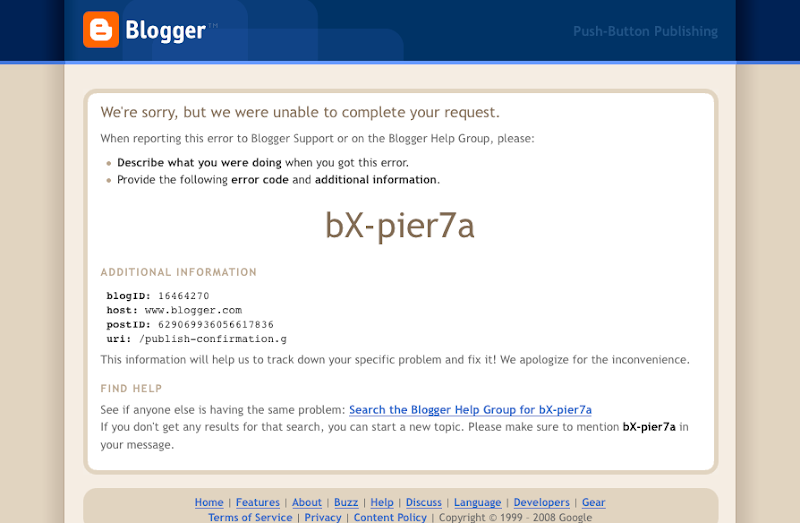
Why do I get a blogger error when I publish a post?

Posted on 03:44 by Unknown


It's been hapenning for the past few weeks. Every time I publish a post, a window pops up and tells me that there has been an error. The post seems to turn out fine, and its published without any problems. Yet, blogger somehow seems to manage to confuse itself everytime.

Speaking of which, reminds me how blogger sometimes feels like Windows now. It has less, improperly developed features to that of other blogging systems like Wordpress and even Typepad. It can barely even format the tags right, and the most scariest of all -- It's owned by Google and Google doesn't seem to be doing much with it right now.

To be honest, I think someone at blogger needs to realize that they've been using the same darn pages for the last 3 years, and I cna barely notice any changes in the design. They do seem to tweak the 'dashboard' page every fortnight though, but it's pretty much useless in terms of improving and enhancing the publishing process. I mean, even Windows Live Writer has more features... surely Blogger must be doing someting wrong.

And then there's the question of support. In the past when I used to try to publish from Safari, it'd tell me that there was no support for Safari. Now, there's no message, and there's still no support for Safari. Assuming that most people who love blogging, or alteast even a small fraction of the bloggers out there would be owning a mac, can't they atleast add some support? Honestly though, talking about all this is making me want to switch to Wordpress.

Back to the errors: Are the errors occurring for anyone else out there? Am I doing something wrong here?
Read More
Posted in blogger, Mac, rant | No comments
Newer Posts Older Posts Home
Subscribe to: Posts (Atom)

Popular Posts

  • WeTransfer Job Ad
    I like using WeTransfer to transfer things that don't fit in emails, mainly because the site is fast, has a large upload limit (2GB!) an...
  • Contact Me!
    Okay so you want to contact me for something? No Problem! E-Mail You can send all your questions , comments , tips (I need a lot of those)...
  • Google Easter Egg: Change your language to Bork! Bork! Bork!
    Just recently I was watching a video of Marissa Meyer talking about how Google goes about optimizing their site to incease performance and u...
  • Improving engine life and saving gas by putting your car on neutral at the lights
    You might have read my article about how my friend told me that putting your car on neutral while going downhill saves some gas and my tho...
  • Top 6 Gmail Tips
    Gmail is probably one of the best free webmail services out there given the enormous number of features it has. Plus, chances are good that ...
  • Free up some more hard drive space on your Windows 8 installation
    I've been using Windows on my mac quite often recently, and although I had budgeted 65 GB of my precious SSD space to windows, it seems ...
  • Review of ActualMultipleMonitors from Actual Tools in Windows 8
    I was recently contacted by Actual Tools and they asked me to try out their newest version of Actual Multiple Monitors . It is a tool that p...
  • iPhone Searching... No Service/No Reception Problem
    Short answer: Turn of iMessages and try sending a text message to yourself to see if you get your network connection back. Explanation: Th...
  • Searching from Firefox Address Bar (like Chrome)
    While I love the concept of being able to search and access websites from only 1 single address bar, Google Chrome isn't exactly the bes...
  • Choosing between Android, iPhone, Windows Phone and Blackberry
    One of the things that I tend to use most everyday is my smartphone. I almost always carry it with me everywhere I go, and also have it clos...

Categories

  • addons
  • adobe
  • ads
  • adsense
  • apple
  • audio
  • blackberry
  • blog
  • blogger
  • blogging
  • cars
  • cellphones
  • clean
  • code
  • comments
  • cricket
  • downloads
  • ebooks
  • email
  • error
  • file sharing
  • firefox
  • fixes
  • free
  • games
  • gas
  • Gmail
  • google
  • hack
  • hotmail
  • installs
  • instant messaging
  • internet
  • internet explorer
  • ipod
  • laptop
  • Linux
  • Live Writer
  • lol
  • Mac
  • mac. mail
  • mail
  • messenger
  • microsoft
  • Microsoft Word
  • money
  • msn
  • music
  • Musings
  • network
  • news
  • online
  • Outlook
  • page
  • peripherals
  • phones
  • photo
  • photoshop
  • php
  • plagiarism
  • problems
  • productivity
  • programming
  • projects
  • rant
  • Registry
  • Review
  • school
  • Screenshots
  • search
  • security
  • software
  • spam
  • speech
  • speed up windows
  • spyware
  • sysfader
  • technology
  • tip
  • tricks
  • tutorials
  • ubuntu
  • updates
  • video
  • virus
  • voip
  • web
  • wi-fi
  • Windows
  • Windows 7
  • Windows Vista
  • Windows XP
  • wireless
  • work
  • wtf
  • youtube

Blog Archive

  • ▼  2013 (5)
    • ▼  October (2)
      • WeTransfer Job Ad
      • iPhone Searching... No Service/No Reception Problem
    • ►  August (2)
    • ►  March (1)
  • ►  2012 (6)
    • ►  December (1)
    • ►  October (1)
    • ►  June (1)
    • ►  May (1)
    • ►  January (2)
  • ►  2011 (19)
    • ►  October (1)
    • ►  August (1)
    • ►  July (8)
    • ►  June (1)
    • ►  February (4)
    • ►  January (4)
  • ►  2010 (41)
    • ►  November (1)
    • ►  October (3)
    • ►  September (3)
    • ►  August (2)
    • ►  July (12)
    • ►  June (2)
    • ►  May (5)
    • ►  April (3)
    • ►  March (4)
    • ►  February (4)
    • ►  January (2)
  • ►  2009 (59)
    • ►  December (1)
    • ►  November (1)
    • ►  October (1)
    • ►  September (3)
    • ►  August (4)
    • ►  July (4)
    • ►  June (14)
    • ►  May (1)
    • ►  April (3)
    • ►  March (3)
    • ►  February (4)
    • ►  January (20)
  • ►  2008 (108)
    • ►  December (22)
    • ►  November (10)
    • ►  October (14)
    • ►  August (13)
    • ►  July (13)
    • ►  June (6)
    • ►  May (13)
    • ►  April (10)
    • ►  March (5)
    • ►  January (2)
  • ►  2007 (33)
    • ►  December (8)
    • ►  November (1)
    • ►  October (4)
    • ►  September (10)
    • ►  August (1)
    • ►  July (2)
    • ►  June (1)
    • ►  May (2)
    • ►  April (1)
    • ►  February (2)
    • ►  January (1)
  • ►  2006 (137)
    • ►  December (1)
    • ►  November (1)
    • ►  October (1)
    • ►  August (1)
    • ►  July (3)
    • ►  June (9)
    • ►  May (20)
    • ►  April (22)
    • ►  March (33)
    • ►  February (20)
    • ►  January (26)
  • ►  2005 (55)
    • ►  December (12)
    • ►  November (19)
    • ►  October (9)
    • ►  September (15)
  • ►  2001 (1)
    • ►  January (1)
Powered by Blogger.

About Me

Unknown
View my complete profile