See Beyond Tech

  • Subscribe to our RSS feed.
  • Twitter
  • StumbleUpon
  • Reddit
  • Facebook
  • Digg

Tuesday, 23 December 2008

Download Free Adobe Illustrator CS3 and CS4 Alternatives

Posted on 16:32 by Unknown
Luckily, you don't have to spend a cent to use products that are just like Adobe Illustrator. In fact, there are several free alternatives that you can download free of cost (provided you have an Internet connection of course) and create art that is just as good if not better than the art you can create in Illustrator. Plus, there are several websites out there that have tutorials related to this software.

So, without further ado, here are some bad-karma free alternatives that you can use instead of Adobe Illustrator CS 4 or CS 3 or whatever version that you wanted to initially use.

Free alternatives for Adobe's Illustrator (or Vector editing software)

Note some of the software here is Linux only (yes, that's right, only runs on linux!) but fear not, take a look at my guide where I mention how to run Linux applications on Windows.

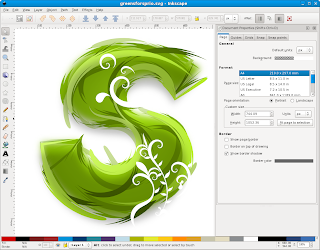
1. Inkscape (Windows, Linux, Mac) - Inkscape is a great piece of free and open source software that can do just about anything Illustrator can do. Bezier curves, typography, an infinite canvas, you name it. Although you will likely have to learn some new tricks and learn Inkscape from scratch if you're used to Illustrator, having free software that you can use whenever you want is always a good thing. It's also the only open source alternative that turns on any platform of your choice.

2. Skencil (Linux / Unix only) - While being Linux only, it is still a very powerful tool to help you create vector art. Check out the preview below! It comes with the Illustrator look and feel and also has similar features. Plus its free too! (well, actually, everything on this page is)


3. Xara LX (Linux only) - Linux only, but boy does it do interesting stuff. It has all the standard tools found in Illustrator, bezier curves and all and has the potential to produce great quality art. Definitely worth a look.


4. OpenOffice Draw (All platforms comes along with OpenOffice.org) - While most people don't find OpenOffice draw to be anything special, people who do not wish to spend the time on learning complex software like InkScape or Illustrator can still take advantage of a much simpler editing program. It's perfect for doing little posters, banners or greeting cards or something with a minimal amount of effort. And you can always save your stuff in a variety of formats.


5. Gimp - While GIMP is almost always known as a raster/bitmap imaging application, You can always still use it to do Illustrator like stuff, provided the factor of scalability that you need isn't as great and the art you are doing is somewhat simple.

There you have it, 5 great alternatives for illustrator, all freely available on the Internet. Also, if you are probably going to use the software for commercial uses, you might want to be kind and donate some money to the developers, however, downloading the applications (and... gasp... their source code!) is completely gratis (or free).
Email ThisBlogThis!Share to XShare to Facebook
Posted in adobe, downloads, free, internet | No comments
Newer Post Older Post Home

0 comments:

Post a Comment

Subscribe to: Post Comments (Atom)

Popular Posts

  • WeTransfer Job Ad
    I like using WeTransfer to transfer things that don't fit in emails, mainly because the site is fast, has a large upload limit (2GB!) an...
  • Contact Me!
    Okay so you want to contact me for something? No Problem! E-Mail You can send all your questions , comments , tips (I need a lot of those)...
  • Google Easter Egg: Change your language to Bork! Bork! Bork!
    Just recently I was watching a video of Marissa Meyer talking about how Google goes about optimizing their site to incease performance and u...
  • Searching from Firefox Address Bar (like Chrome)
    While I love the concept of being able to search and access websites from only 1 single address bar, Google Chrome isn't exactly the bes...
  • Unlock your Galaxy S Phone for free?
    Warning: Check with your service provider and manufacturer before you unlock your phone. Unlocking your phone will most certainly void your ...
  • Subscribe!
    Beyond-Teck is constantly being updated all the time! So it might be a little hard for you to keep up with all the tutorials and tricks an...
  • Review of ActualMultipleMonitors from Actual Tools in Windows 8
    I was recently contacted by Actual Tools and they asked me to try out their newest version of Actual Multiple Monitors . It is a tool that p...
  • Boot Camp Public Beta- XP on Macs
    Macs do Windows, too. Interestingly enough Apple has finally created their long awaited software to make Macs boot windows. Which can only ...
  • Using OpenOffice Writer as my Blogging Application
    I don't know how many people are actually aware that you can actually use Microsoft Word as a blogging client, but apparently, you can a...
  • How to make OS X Snow Leopard look and feel like Lion
    To be honest, I don't intend on upgrading to Lion until it works seamlessly with my current setup. From what I can tell for now, with a ...

Categories

  • addons
  • adobe
  • ads
  • adsense
  • apple
  • audio
  • blackberry
  • blog
  • blogger
  • blogging
  • cars
  • cellphones
  • clean
  • code
  • comments
  • cricket
  • downloads
  • ebooks
  • email
  • error
  • file sharing
  • firefox
  • fixes
  • free
  • games
  • gas
  • Gmail
  • google
  • hack
  • hotmail
  • installs
  • instant messaging
  • internet
  • internet explorer
  • ipod
  • laptop
  • Linux
  • Live Writer
  • lol
  • Mac
  • mac. mail
  • mail
  • messenger
  • microsoft
  • Microsoft Word
  • money
  • msn
  • music
  • Musings
  • network
  • news
  • online
  • Outlook
  • page
  • peripherals
  • phones
  • photo
  • photoshop
  • php
  • plagiarism
  • problems
  • productivity
  • programming
  • projects
  • rant
  • Registry
  • Review
  • school
  • Screenshots
  • search
  • security
  • software
  • spam
  • speech
  • speed up windows
  • spyware
  • sysfader
  • technology
  • tip
  • tricks
  • tutorials
  • ubuntu
  • updates
  • video
  • virus
  • voip
  • web
  • wi-fi
  • Windows
  • Windows 7
  • Windows Vista
  • Windows XP
  • wireless
  • work
  • wtf
  • youtube

Blog Archive

  • ►  2013 (5)
    • ►  October (2)
    • ►  August (2)
    • ►  March (1)
  • ►  2012 (6)
    • ►  December (1)
    • ►  October (1)
    • ►  June (1)
    • ►  May (1)
    • ►  January (2)
  • ►  2011 (19)
    • ►  October (1)
    • ►  August (1)
    • ►  July (8)
    • ►  June (1)
    • ►  February (4)
    • ►  January (4)
  • ►  2010 (41)
    • ►  November (1)
    • ►  October (3)
    • ►  September (3)
    • ►  August (2)
    • ►  July (12)
    • ►  June (2)
    • ►  May (5)
    • ►  April (3)
    • ►  March (4)
    • ►  February (4)
    • ►  January (2)
  • ►  2009 (59)
    • ►  December (1)
    • ►  November (1)
    • ►  October (1)
    • ►  September (3)
    • ►  August (4)
    • ►  July (4)
    • ►  June (14)
    • ►  May (1)
    • ►  April (3)
    • ►  March (3)
    • ►  February (4)
    • ►  January (20)
  • ▼  2008 (108)
    • ▼  December (22)
      • Using OpenOffice Writer as my Blogging Application
      • Merry Christmas, Happy Hanukah, Happy Kwanzaa and ...
      • List of Websites for FREE math help, practice and ...
      • Download the Photoshop CS4 alternatives for free!
      • Download Free Adobe Illustrator CS3 and CS4 Altern...
      • The real way to clean up your Windows registry and...
      • Backing up and restoring your Windows Registry
      • Backing up and Downloading your PicasaWeb Pictures
      • A new easier way to back up your Blogger Blog
      • Use Active Screen Corners for increasing productiv...
      • Installing and uninstalling fonts on a Mac
      • Excellent sites for free Windows and Mac fonts
      • Installing and removing Fonts on Windows
      • How to 'steal' custom emoticons in MSN Messenger
      • How long does it take you to put up a post?
      • Use a free online virus scanner that won’t slow yo...
      • Internet Explorer Crashes All the Time
      • Boost Productivity by opening applications faster ...
      • Cool yet helpful tricks on Windows XP or Vista
      • Microsoft’s Phishing Filter?
      • Protect yourself from Malicious Websites for free
      • 5 steps make Windows XP faster in 2 mins FREE!
    • ►  November (10)
    • ►  October (14)
    • ►  August (13)
    • ►  July (13)
    • ►  June (6)
    • ►  May (13)
    • ►  April (10)
    • ►  March (5)
    • ►  January (2)
  • ►  2007 (33)
    • ►  December (8)
    • ►  November (1)
    • ►  October (4)
    • ►  September (10)
    • ►  August (1)
    • ►  July (2)
    • ►  June (1)
    • ►  May (2)
    • ►  April (1)
    • ►  February (2)
    • ►  January (1)
  • ►  2006 (137)
    • ►  December (1)
    • ►  November (1)
    • ►  October (1)
    • ►  August (1)
    • ►  July (3)
    • ►  June (9)
    • ►  May (20)
    • ►  April (22)
    • ►  March (33)
    • ►  February (20)
    • ►  January (26)
  • ►  2005 (55)
    • ►  December (12)
    • ►  November (19)
    • ►  October (9)
    • ►  September (15)
  • ►  2001 (1)
    • ►  January (1)
Powered by Blogger.

About Me

Unknown
View my complete profile