We all have heard of Digital Cameras and what they do (taking photographs is what I mean), but how exactly do they work? And what happens when you import that picture into your computer... this question has intrigued me for ages (okay... may be not) however my teacher did an excellent job of explaining it (no really ... he did  ). Anyways if you were curious of what are the processes that go on... look not further, I'm sure you'll find the answer to them in this post!
Digital Cameras have something in them called the Charge-coupled device which essentially captures the pictures, and then stores them in the camera. The job of the CCD is to capture the pixels and the data of the image. The CCD sort of works like the photo film in olden time cameras (well... actually professionals still use high quality film cameras). The CCD then stores all the data in the form of digits and hence it is called the digital camera... simple!
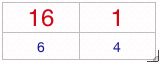
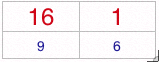
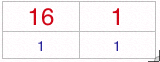
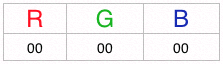
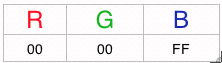
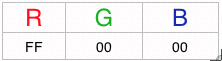
Now when you plug in the camera to your computer all the data gets transferred to your computer, well when I mean data I mean the pixels. Hex colour codes for each of the pixels are transfred So basically what you get is a bunch of hex codes that make up a picture. This is where resolution comes into play!
Resolution is basically amount of data per given amount of area Usually resolution is defined as dots per inch (or DPI), the more dots you have the more better the picture is... it's as simple as that. For the internet the standard is 72 DPI, because you will get a clear picture (since you are using pixels on the monitor), however for printing you should always have 300 DPI, because otherwise it will just look like a bunch of squares! So when we talk about 2 megapixel cameras it means that the picture is going to have 2 million pixels in it! That's why people say that the better the resolution of your digital camera the better the pictures you have (because the more the pixels and different colours, the better the picture blends in... digital picture are made up of dots that blend in together). You can format the picture to have higher resolution, but if you do that then the computer (using complex algorithms) makes up pixels (it basically distorts the pixels around so that there are more pixels), but that won't help much.
After the picture (call it a set of pixels made up of hex codes if you wish) is imported you can save the picture in different formats (file formats). Whenever you save the file in a certain format it will add and extension to the image as well (for example if you save it in JPEG format it's extension will be .jpg) There are many types of file formats however I'll just mention the most important ones here:
PSD (or Photoshop Document): When you save a picture as a PSD, the main thing that happens in that it keeps the picture as it iswithout changing anything, and it saves the picture just like it was with the same number of hex codes that it previously had. And .psd files usually need a such as Photoshop to open them. PSD files are useful because no matter how many times you open or close them they will retain their original quality. Another bonus of having PSD files is that you can have layers (which makes it easier for you to change things around)
TIFF (or Tagged Image File Format): A .tiff file will also maintain the original quality that it was created in, and it will not take away anything from a picture. The backside to using tiff files is that like PSD files their sizes are a bit too big for uploading or sharing (and photos are usually taken to share!)
JPEG (or Joint Photographic Experts Group format): Whenever you save a picture as a .jpg file it will automatically reduce the size of the picture, because it compresses them. What JPEG formating does is, if the pixels look similar (have similar hex code values) it gets rid of them using certain algorithms. So to the average human eye you won't notice anything however the computer will have less hex codes to deal with so it will reduce the size of the picture. However you should only export picture to JPEG format after you've changed it as necessary or else, it will keep on compressing the size of the picture!
GIF (Graphics Interchange Format or some programs call is CompuServe Gif because if was created by them): A .gif file is also somewhat compressed, but the advantages of gif files is that is can have frames. And it can also have transparent images (not as good as PNG's though since PNG are newer). However gif files are really good for compressing (for example if you optimize something with photoshop chances are that it will be using gif).
PNG (of Portable Network Graphics): PNG's use sort of like a loselessy format of compression, and are really good for pictures if you are looking for uploading it so sites (so it's quality is good). PNG's like GIF's have the ability of having transparency, so they are used widely on sites and so on. A PNG also has other things such as interlacing (when the image loads it first loads the basic things in the picture, then the details and so on...) like GIF's.
Another important thing to remember is that PNG's, PSD's, GIF's, TIFF's and similar file formats use lossless data compression, that's why they don't compress the file (get rid of some hex codes). Where as file formats such as JPEG use lossy data compression, which makes the pictures loose their original quality.
That's pretty much the basics (yep this is very basic stuff...) of file formats in digital imaging, I'm sure that I'll write more about this interesting topic when I get more time!
 ). Anyways if you were curious of what are the processes that go on... look not further, I'm sure you'll find the answer to them in this post!
Digital Cameras have something in them called the Charge-coupled device which essentially captures the pictures, and then stores them in the camera. The job of the CCD is to capture the pixels and the data of the image. The CCD sort of works like the photo film in olden time cameras (well... actually professionals still use high quality film cameras). The CCD then stores all the data in the form of digits and hence it is called the digital camera... simple!
Now when you plug in the camera to your computer all the data gets transferred to your computer, well when I mean data I mean the pixels. Hex colour codes for each of the pixels are transfred So basically what you get is a bunch of hex codes that make up a picture. This is where resolution comes into play!
Resolution is basically amount of data per given amount of area Usually resolution is defined as dots per inch (or DPI), the more dots you have the more better the picture is... it's as simple as that. For the internet the standard is 72 DPI, because you will get a clear picture (since you are using pixels on the monitor), however for printing you should always have 300 DPI, because otherwise it will just look like a bunch of squares! So when we talk about 2 megapixel cameras it means that the picture is going to have 2 million pixels in it! That's why people say that the better the resolution of your digital camera the better the pictures you have (because the more the pixels and different colours, the better the picture blends in... digital picture are made up of dots that blend in together). You can format the picture to have higher resolution, but if you do that then the computer (using complex algorithms) makes up pixels (it basically distorts the pixels around so that there are more pixels), but that won't help much.
After the picture (call it a set of pixels made up of hex codes if you wish) is imported you can save the picture in different formats (file formats). Whenever you save the file in a certain format it will add and extension to the image as well (for example if you save it in JPEG format it's extension will be .jpg) There are many types of file formats however I'll just mention the most important ones here:
PSD (or Photoshop Document): When you save a picture as a PSD, the main thing that happens in that it keeps the picture as it iswithout changing anything, and it saves the picture just like it was with the same number of hex codes that it previously had. And .psd files usually need a such as Photoshop to open them. PSD files are useful because no matter how many times you open or close them they will retain their original quality. Another bonus of having PSD files is that you can have layers (which makes it easier for you to change things around)
TIFF (or Tagged Image File Format): A .tiff file will also maintain the original quality that it was created in, and it will not take away anything from a picture. The backside to using tiff files is that like PSD files their sizes are a bit too big for uploading or sharing (and photos are usually taken to share!)
JPEG (or Joint Photographic Experts Group format): Whenever you save a picture as a .jpg file it will automatically reduce the size of the picture, because it compresses them. What JPEG formating does is, if the pixels look similar (have similar hex code values) it gets rid of them using certain algorithms. So to the average human eye you won't notice anything however the computer will have less hex codes to deal with so it will reduce the size of the picture. However you should only export picture to JPEG format after you've changed it as necessary or else, it will keep on compressing the size of the picture!
GIF (Graphics Interchange Format or some programs call is CompuServe Gif because if was created by them): A .gif file is also somewhat compressed, but the advantages of gif files is that is can have frames. And it can also have transparent images (not as good as PNG's though since PNG are newer). However gif files are really good for compressing (for example if you optimize something with photoshop chances are that it will be using gif).
PNG (of Portable Network Graphics): PNG's use sort of like a loselessy format of compression, and are really good for pictures if you are looking for uploading it so sites (so it's quality is good). PNG's like GIF's have the ability of having transparency, so they are used widely on sites and so on. A PNG also has other things such as interlacing (when the image loads it first loads the basic things in the picture, then the details and so on...) like GIF's.
Another important thing to remember is that PNG's, PSD's, GIF's, TIFF's and similar file formats use lossless data compression, that's why they don't compress the file (get rid of some hex codes). Where as file formats such as JPEG use lossy data compression, which makes the pictures loose their original quality.
That's pretty much the basics (yep this is very basic stuff...) of file formats in digital imaging, I'm sure that I'll write more about this interesting topic when I get more time!